Export Word in Claude Code with the md2docx Skill
In Claude Code, you can use the md2docx Skill to directly convert Markdown content to professionally formatted Word documents. This Skill lets Claude automatically handle document conversion without any manual steps.
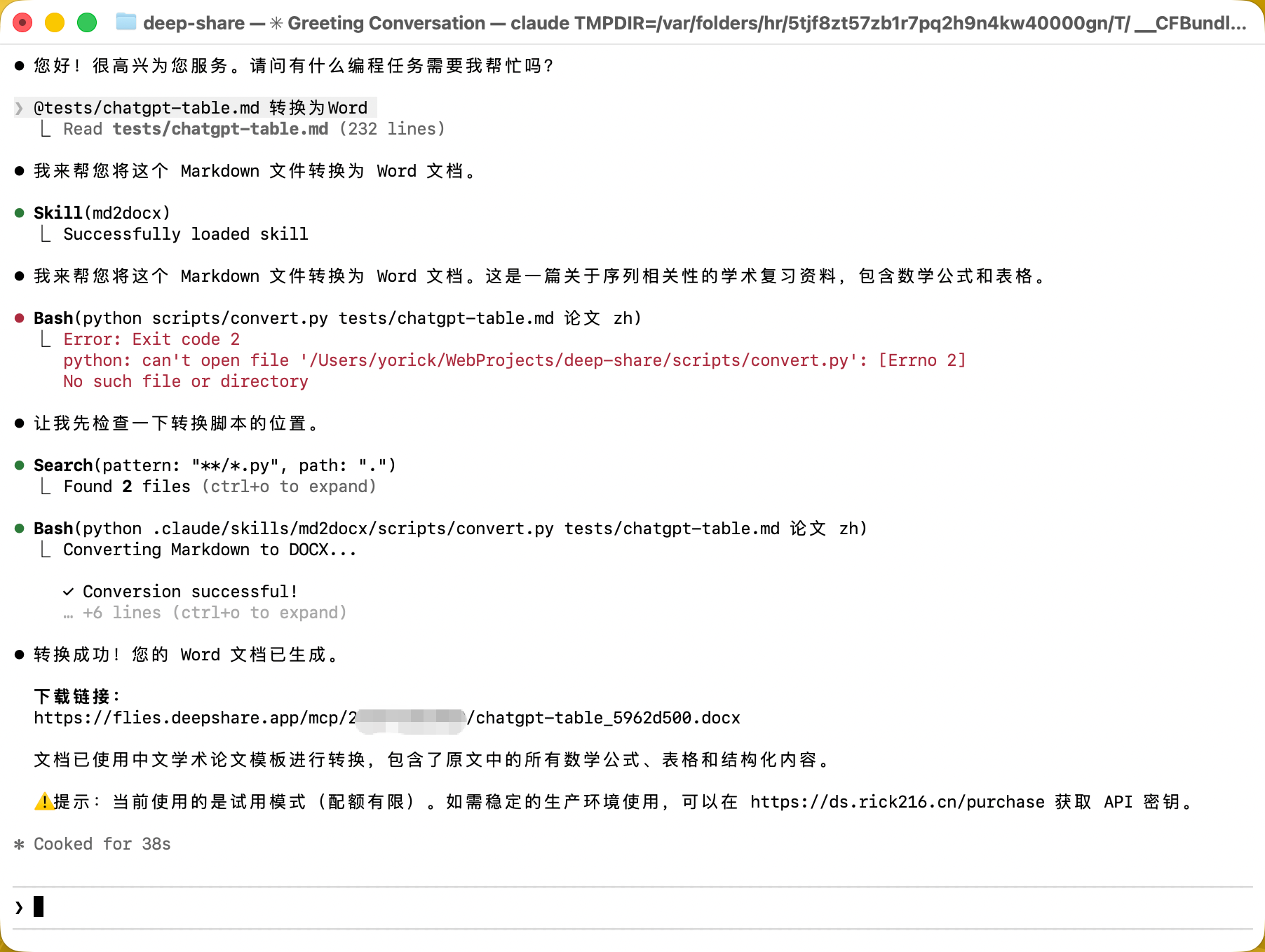
Key Features
- Convert Markdown to Word directly in conversation
- Supports multiple Chinese and English templates (thesis, article, book, etc.)
- Automatically selects the API Key (environment variable → Skill config → trial key)
- Supports complex formats including math formulas, code blocks, and tables
- Returns a cloud download link for easy access
Install the Skill
Method 1: Manual Installation (Recommended)
-
Create the Skill directory in Claude Code:
mkdir -p ~/.claude/skills/md2docx -
Download the Skill file:
- Visit md2docx Skill GitHub
- Download
SKILL.mdand move it to~/.claude/skills/md2docx/SKILL.md
-
Create the conversion script directory:
mkdir -p ~/.claude/skills/md2docx/scripts -
Download the
convert.pyscript to thescripts/directory
Method 2: Install via Extension (Coming Soon)
The Claude Code extension marketplace will soon offer the md2docx Skill for one-click installation.
Configure the API Key
You can configure the API Key in three ways, in order of priority from highest to lowest:
Method 1: Environment Variable (Recommended)
# Add to ~/.zshrc or ~/.bashrc
export DEEP_SHARE_API_KEY="your_api_key_here"

# Apply the configuration
source ~/.zshrcAdvantage: Applies globally; shared across all projects
Method 2: Skill Configuration
Edit ~/.claude/skills/md2docx/SKILL.md and add to the YAML header:
---
name: md2docx
description: Convert Markdown to Word...
api_key: "your_api_key_here"
---Advantage: Dedicated configuration for this Skill
Method 3: Trial Key (No Configuration Needed)
If no API Key is configured, the trial key will be used automatically:
f4e8fe6f-e39e-486f-b7e7-e037d2ec216fNote: The trial key has limited quota. It is recommended to purchase an official API Key.
Get an API Key
- Purchase a DeepShare API Key
- The trial key is for testing functionality only
Usage
Basic Conversion
Chat with Claude in Claude Code:
You: Please convert this Markdown to a Word document

# My Report

This is a test document.

## Section 1

Content...
Claude will automatically:
- Recognize this as a Markdown-to-Word conversion task
- Load the md2docx Skill
- Save the Markdown content to a temporary file
- Run the conversion script
- Return the download link
Example output:
✓ Conversion successful!

Download link:
https://flies.deepshare.app/mcp/abc123/report_xyz.docx
Specify a Template
You can ask Claude to use a specific template:
You: Please convert this paper to Word using the "thesis" templateOr:
You: Convert to a Word document in English article formatClaude will automatically select the appropriate template (e.g., thesis, article, etc.).
Supported Templates
Chinese templates (language: zh):
templates— General default template论文— Academic paper format论文-首行不缩进— Western paper format论文-标题加粗— Paper format with emphasized headings英文通用— English typesetting in a Chinese environment
English templates (language: en):
templates— General default templatearticle— Article/report formatthesis— Academic paper formatbook1,book2— Book publishing formatsshort-fiction— Short story/creative writing format
How It Works
- Trigger detection: Claude recognizes the Markdown-to-Word request
- Skill loading: Automatically loads the md2docx Skill
- Prepare content: Saves the Markdown content to a temporary file
- API Key selection:
- Check environment variable
DEEP_SHARE_API_KEY - If not set, check the Skill configuration
- If neither, use the trial key
- Check environment variable
- Execute conversion: Run the
scripts/convert.pyscript - Return result:
- Success: Provide download URL
- Failure: Explain the error and solution
- Cleanup: Delete the temporary file
Advanced Usage
Batch Conversion
If you have multiple files to convert:
You: Please convert all Markdown files in the docs/ directory to WordClaude will iterate through the files and convert them one by one.
Integrate into a Workflow
You can ask Claude to automatically convert after completing a document:
You: Write a product specification document for me, then convert it to WordCustom Skill Configuration
You can edit ~/.claude/skills/md2docx/SKILL.md to customize:
---
name: md2docx
description: Convert Markdown to Word...
api_key: "your_default_key"
---
Technical Support
- Email: contact@deepshare.app
- WeChat: yorick_cn (note: DeepShare)
- Purchase/Query: https://ds.rick216.cn/purchase-en.html
Related Resources
Tip: This Skill shares the API Key and quota with DeepShare’s other features (browser extension, MCP server) — one purchase works across multiple scenarios!